SEO and UX: 7 Key Page Upgrades To Boost Performance
SEO and UX (User Experience) both impact website performance in different ways, but the goal for any website is to incorporate elements of both to make sure the site can be found by its target audience, and that they have great experience once they get there. You can’t really have a great, functioning and visible website without addressing both.
Search Engine Optimization (SEO) is the process of improving your website to increase qualified organic traffic from search engines like Google, Bing, and others. SEO helps search engines understand your content, and helps users find your website.
The International Organization for Standardization (ISO) defines user experience as “A person's perceptions and responses that result from the use or anticipated use of a product, system or service.” Positive UX is important to the continued success of any SEO strategy.
User Engagement and SEO performance
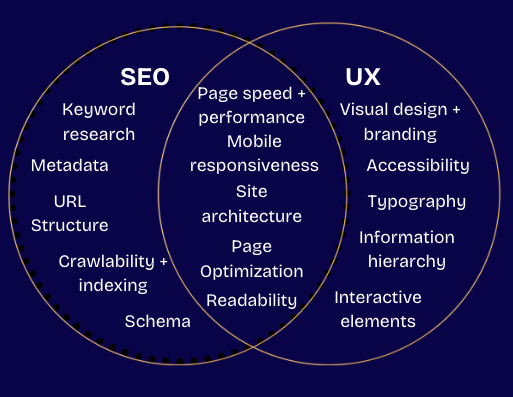
The overlap in the Venn diagram of UX and SEO is vast, and that’s where the magic lies. In the 15 years I’ve been doing this I’ve seen only seen UX factors become more important to SEO visibility. That’s because the underlying objective is to create great content, and a great experience for your users.
UX factors like speed, mobile responsiveness, and readability all impact search engine algorithms. So while SEO helps people find your site, if they have a bad user experience then even a site with perfect technical SEO implemented really doesn’t mean much. I want to talk specifically about a handful of key website pages/sections, and what it looks like to consider UX as part of the strategy whether you are building a brand new website or optimizing an existing one.
How to Improve UX on Key Pages:
About Us as a Trust Signal
This seems to be an afterthought for a lot of companies in the last few years, but I would argue that the About page is one of the most important pages on any website. Personally, if I land on a website that is missing an about page/about section, I am immediately wondering what they are trying to hide. This is an expected page where your potential clients are coming to find out if you are right for them, what your company does, why you started it, a bit about the owner(s)/team, and how to contact you. Basically they want to know who they are dealing with and if you can help them.
Example About page outline:
Headline and a paragraph or two about who you serve
What your company does and why it was started - focus on problems you solve, outcomes, and this could include company values/mission
Owner/team section - include a headshot and a quick bio of anyone included here
Contact info/next steps - this could be a button that links to your contact page, a calendar booking link, or whatever that next step is that makes sense for your business
The About page is in the top 5-visited pages on 75% of websites I track - the exceptions are heavily driven by blogs, courses, or products. Check yours now because it could be the very first impression a potential client has of you!
Contact Page Optimization
Like other UX elements, all the traffic in the world cannot solve problems on your contact page.
Elements to add to your contact page:
A simple form - only include what is really needed like Name, Email, Phone, possibly Website and Location. If you have more than a handful I would scrutinize what is really needed at this stage and at the very least make some fields not required
What to expect - like estimated response time, info about next steps
If you have a physical location clients/customers will visit, embed a map, add your address, hours, and maybe an image of your storefront.
Easy to find contact info
Social proof like reviews, stats, etc. can increase submission rates
It should go without saying but make sure you are testing your contact form (and any other form you have) on mobile as well as desktop. One of the biggest friction points I see is a contact form (or any form in general) that either doesn’t work, or has way too many required fields.
Take a fresh look at your form and remove any fields that aren’t truly necessary. For some, like product service selection, additional comments etc. that people might not necessarily know the answer to, consider leaving those fields off or at least don’t make them required. If you’re not convinced that you’ll get better results by simplifying forms, test it out and let the numbers speak for themselves!
404 Page Best Practices
During an audit I will always look at your 404 page. A lot of website owners may not even know this exists, what theirs looks like, or that they can change it. Most platforms have a default template for 404 pages that can look boring at best, and like a way more serious error than landing on an incorrect URL on a site at worst.
Your 404 page should have:
A link to your home page
If you use site search you could add that as well
Design elements that feel like your site - like header, footer, background, image, colors, fonts, etc. Not saying you need all of those elements but even if you pick one or two that is much better than a black and white page that feels completely disorienting.
404s are not inherently bad and all websites will have some traffic that goes there. These can come from mistyped URLs, incorrect URLs linked internally or externally, or they may be intentional as a result of pages becoming irrelevant with no new equivalent page to redirect to. All of those scenarios are expected and normal.
For the majority of websites, traffic to your /404 page is a drop in the bucket. However, it's still worth taking a look at in case there are redirects you never made during a domain change, redesign, or have changed URLs for existing pages for any other reason. A little attention can go a long way in improving user experience, and making sure visitors land where you intended them to go.
I had a client that had 7k 404 page views (10% of their total traffic) in 2025, because they didn’t redirect old URLs to their new equivalents during a redesign. While this is not the norm, this is a prime example of why I will harp on having an easy to use 404 page that looks like it’s an intentional part of your site, as well as implementing URL redirects when necessary.
Want to check on the traffic that is going to your 404 page? It’s easy if you use Google Analytics (GA4). Once logged into your property:
Click on Reports on the left screen
Select “View user engagement & retention > Pages and screens” under Business objectives
On the top of the section with report #s, change Page path and screen class to Page title and screen name
Select the + next to the first field
Add Landing page + query string
Now in the Search bar, type in 404 or Not Found
You will see page view numbers, and the URL strings for your traffic
If pages come up that have a new URL, create 301 redirects so those old URLs are not going to your 404 page. It’s important to note that pages should be redirected only if they have a new, equivalent URL that has the same info.That doesn’t mean redirect an old product to a new one if they aren’t the same. That doesn’t mean redirect an old blog post to a new one if they use the same keyword but the content is totally different.
For pages that are truly inactive, outdated, etc. it’s ok to let them go to /404, because what that user is looking for is not available. Alternatively, you can keep the outdated URL as is with a message like “sorry, that product no longer exists” with a link to current product listings. If you’re not sure, put yourself in the mind of someone visiting your site. What would you expect, and what would you want to do next?
In the months and weeks leading up to a site launch or redesign, pay close attention to URL structure. This is when URL structure and individual URLs are most likely to change and is the perfect time to eliminate unnecessary 404 traffic by redirecting old URLs to their new paths! This is a very common technical SEO issue that may seem daunting but is actually really easy to fix and avoid in the future.
FAQs for SEO and UX
Frequently asked questions have increasingly become standard on most websites, which is usually great! I typically advise clients to add FAQs to their site if they don’t have any as it’s a great way to help answer common questions before potential clients reach out. The more they know about you/your product/service in advance, the more time you can spend on helping with their unique needs.
Guidelines for FAQs:
Add a page or a section that includes genuinely relevant questions with helpful answers
If you have more than a handful of questions, organize them into topics to make it easier for users to scan
Don’t add multiple variations of the same question
Document FAQs from your actual clients and incorporate those into your list over time. This could look like an internal document or form that is constantly updated, tracking questions sent in via email/forms, etc.
Think about FAQs beyond the literal sense and use your content to answer common questions you hear from clients
If you haven't heard, Google stopped supporting FAQ schema in of May 2026. Does that mean you should remove/stop creating FAQ content? Not if it's genuinely helpful. Does that mean you should remove existing schema? You may have reasons other than Google to use FAQ schema. Ultimately, it’s up to you but I wouldn’t waste too much time or lose sleep over it.
Product/Service Pages and Why Pricing Matters
Each of your products/services should have its own individual page (do as I say, not as I do) that is clear about what’s included, who it’s for, what problems it solves/outcomes and what the cost is. Now I know a lot of business owners shy away from including pricing details on their website and I will argue the case for being transparent here every single time. Personally, if I am shopping around for any type of product or service, if there is no pricing tier, estimate, or ballpark included I am moving on to a competitor that will show me at least a starting price 99% of the time.
Individual pages benefit both SEO and UX; they give you a chance to rank for a larger variety of keywords rather than competing on a single page. You can also more fully explain each product/service fully vs possibly overwhelming users with everything you have on a single page.
Resources that Reinforce Topical Authority
Let’s talk about resources - I’m talking blogs, podcasts, research, press releases and more. If you have a brand new site, you may not have many (or any), but as your site grows you will likely have a library of resources. They should be easy to find and navigate by type and topic. They should lead users down the funnel. They should link together naturally along with other pages on your website. They should reinforce your topical authority.
Blogs and written resources specifically need to have E-E-A-T (Experience-Expertise-Authoritativeness-Trustworthiness) signals - part of Google’s quality rater guidelines. Each post should include author bio (highlighting their expertise and experience), publish date, and most importantly the author’s lived experience with the topic.
Sitewide Page Elements:

Other on-page elements used across your site are also important to optimize for SEO as well as user experience.
Navigation/Header - list your key pages logically, make sure each page can easily be clicked across different devices. Look at your navigation on multiple different pages to check for any templates that could interfere with the nav design.
Footer - similar as above, don’t list all pages if you have more than a handful - think of the most important categories, plus contact info and social profiles.
CTAs (Call to Actions) - a CTA should be visible on each page and lead users to the next step. Having strong CTAs combined with strategic SEO and UX are key ingredients to increasing conversion rates.
Forms - like with the contact form mentioned, make sure not to use more fields than necessary They should know exactly what happens next,
Media - videos and images need love too! Images should have alt text and need to be minimized as much as possible so they don’t slow your pages down. Videos should be optimized with an eye-catching thumbnail and have captions embedded.
Interactive elements - any and all other interactive elements should have a purpose and should function properly on desktop as well as mobile.
My SEO/UX Challenge to You:
My challenge to you is to go through your key pages and judge them based on SEO principles and a positive user experience. Pull up your home page and turn off your screen for a few seconds. Take those few seconds to really put yourself in the shoes of your ideal client. Now turn on your screen and navigate your site like a user might. Pay special attention to the key pages and elements called out above. Click on everything. Fill out all the forms. Is anything broken? Now go through the same process on your phone. Does everything still work? Can you read and interact with everything on all pages?
Take an hour to fix any glaring issues. Then come back in 90 days and repeat :)
SEO and UX Strategy Help
Need help with incorporating UX into your SEO strategy? Whether you just need some guidance or you just don’t have the time to implement SEO yourself, contact me for a Free Consultation! I would love to help you with a strategy that will work for you long-term. Let’s check in to see where you’re at and how I can best support you right now :)