Page Indexing Explained: What It Is, Why It Matters, and How to Fix Common Issues

Imagine you’re reading a book. You finish chapter 7, turn the page, and suddenly it jumps to chapter 10. Chapters 8 and 9 are available, they’re just at the author’s house, didn’t you know that? All you have to do is go there to get the missing pages that make the book make sense.
That’s what it’s like when web pages that are intended to be public cannot be found via search methods. The pages exist and are live, but they are at the “author’s house” - in this case your website - but if someone doesn’t already know about your website, they would never know those specific pages exist. This points to page indexing problems and inconsistencies, and they are one of the most common technical SEO issues that leave traffic on the table.
What is Page Indexing?
Page indexing refers to the process of search engines discovering and crawling website pages, and making pages with no technical or quality issues available in their index (i.e. search engine results pages or SERPs). During this process, all page elements are analyzed including text, metadata, alt attributes, images, videos, and more. When someone enters their query into Google (or any search engine), Google searches its index to find what they deem the most relevant results. If your pages aren’t in that index, they will not show up in search results.
Crawling is the first step to a page getting indexed. For example, Google’s web crawler (sometimes referred to as a spider) discovers and visits your pages and knows they exist, that is crawling. Pages can be crawled but not indexed, which is a common reason why your pages may not be showing up.
What happens when a page is not indexed?

Page indexing is particularly important because if it’s not understood and checked on, it could mean leaving traffic on the table. I once had a client that had a website live for an entire year, and couldn’t understand why she was only getting direct and email traffic. Right away I took a look at the backend of her site and found there was a setting that was blocking all search engines from crawling her entire website!
NOTE: if you have a Squarespace site, it’s worth going to Settings > Website > Crawlers and verifying Block Search Engine Crawlers is not checked. If it is, none of your website pages will be indexed. Also, right below this is a checkbox called Block Known Artificial Intelligence Crawlers. If this is checked, it may impact your site showing up in AI chat responses.
Page indexing is something that should be checked regularly along with your crawled pages, the pages on your sitemap, and knowing what the status of your pages are. I like to keep a spreadsheet of my and my clients’ URLs to track this on a monthly or quarterly basis to make sure there are no surprises!
How to check if your pages are indexed:
If you don’t already have a Google Search Console account, I suggest signing up for one. GSC is free and is the primary tool for managing Google indexing. One of the first things you should do once your new website is live is to submit your sitemap to start the indexing process. Go to Indexing > Sitemaps and add your sitemap URL (usually sitemap.xml). Once your sitemap pages have been crawled, you will start to see your Pages report under Indexing start to populate.
It’s important to track because if you’ve done the work to create a great site but your most important pages aren’t indexed, nobody is finding them in the wild. Too many times I’ve audited sites that have been published for months or even a year, and nobody ever checked the indexing report to fix simple issues that help pages get discovered by users. Any good website audit will show you pages that have been crawled and indexed so you can identify any pages that may have issues.
You can also use the URL inspection tool (toolbar at the top of the page when signed in to GSC) to paste in any URL to check its index status, whether it was found in any sitemaps or referring pages, https status, and request indexing for that individual page if necessary.

^ Google Search Console URL inspection tool

^ Bing Webmaster Tools URL inspection tool
NOTE: I would also suggest setting up a Bing Webmaster Tools account at the same time and submitting your sitemap. The process is pretty similar as in Google. Not only will this make your site more visible in Bing search directly, a lot of answers for popular llms are scraped directly from Bing SERPs.
What pages should not be indexed?
There are certain pages that you probably do not want indexed for anyone to find. A few examples include:
Thank you/confirmation pages, and other pages that you want hidden
Special campaign landing pages that should only be seen by a specific audience or traffic source
Internal pages with duplicate content like:
Paginated blog or resource pages (ie page 2 of your blog that will have the same content as the posts themselves)
Duplicated landing pages that you are using in multiple places - like an offer that’s on your website that you DO want indexed, but you duplicated that landing page to use in a paid search campaign - you DO NOT want the 2nd page indexed
Drafted, staged, and sandbox pages that are either not live yet or are versions of live pages you are updating and are intended to be preview pages for your internal team
How to set a page as noindex:
Most website platforms have an option in individual page settings that you can select whether or not a page should be indexed. In Squarespace: Click the gear icon to get to settings on each page, click on SEO, scroll to the bottom, and toggle “Hide Page from Search Results” set on or off. Other platforms have similar settings by page.
Otherwise, if you’re comfortable with updating HTML you can add this code to the <head> section of your page: <meta name="robots" content="noindex">
What are common indexing problems?
Both Google and Bing will specify any indexing issues, but here are some of the most common ones that are good to know:

4xx errors: most common are 404s (not found), but could also be 401 (unauthorized request), 403 (access forbidden)
Server error (5xx): Any type of server-level issue meaning that Googlebot either couldn't access the page URL, the request timed out, or your site was busy
Redirect errors: a redirect chain is too long or contains a bad or empty URL, page leads to a redirect loop, or redirected URL is too long
Canonical issues: canonical tag is on another page, or Google selected a duplicate or alternate page as the canonical page to be indexed
URL blocked by robots.txt: the page is explicitly blocked in your robots.txt file or could be unintentionally blocked by robots.txt based on the page URL path
URL marked ‘noindex’: the page has noindex code and therefore was not indexed. If this is intentional, there is not actually a problem. If a page has noindex code but you do want it indexed, remove the code and/or check the page settings to make sure it’s available to be found
Crawled - currently not indexed: meaning the page has been crawled by Googlebot, but is not currently indexed - the page may or may be indexed in the future and a lot of times this is a temporary status between page publishing and indexing
Discovered - currently not indexed: a step before crawled but not indexed, the page has been “discovered” but not crawled yet and is typically scheduled to be crawled at a future date
Mobile issues: Ever since mobile-first indexing was prioritized for the entire web in 2020, web pages’ mobile functionality is taken into consideration before the desktop version when it comes to indexing and ranking. This won’t come up on your indexing report, but you should always check how each page renders and functions on mobile before publishing, and while making any sort of updates.
Low quality content: if there don’t seem to be technical issues with the page(s) you are trying to index, it’s most likely that your content isn’t providing good value to users. Thin, duplicate, or unhelpful content may be the reasons. This also will not show up an indexing report in most cases.
An important point I want to really highlight is the last common issue listed. While I am outlining the typical path to get your pages crawled and indexed and point out common fixes for indexing issues, there is no 100% guarantee that all your pages you want to be indexed will be. Google won’t always use your sitemap, and they will not and cannot index every single page on the web. If you are having trouble getting pages indexed and you cannot point to any technical issues, it is most likely a quality issue.
The most common scenarios for unwanted indexing status are:
New pages: you are building a new website (or a new page) and want it to stay hidden until you’re ready to show it off to the world. The site (or page) is part of a launch, but page indexing gets missed and the page stays hidden unintentionally.
Copied pages: you want a new page that is similar to an existing page that you have hidden from search engines. The new page inherits the same settings, goes unchecked, and indexing status is never changed.
Old/outdated pages: Pages that were once public but should now be hidden (or vice versa) never get updated.
Old code: noindex HTML is hardcoded on a page, making it easy to overlook.
How to fix page indexing issues?
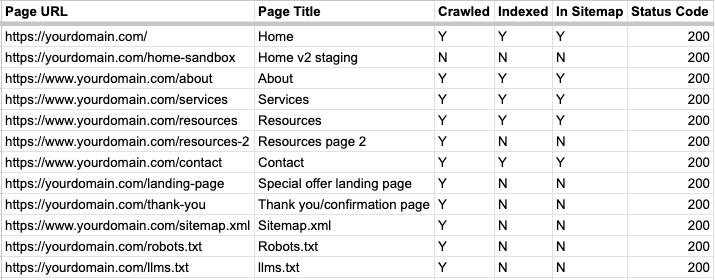
As a spreadsheet person, when I am running a website audit I create a sheet specifically for indexing. It helps to have a visual of each page to track crawling and indexing status, what is on your sitemap(s), and the status (200, 301, 404, etc.) of each page. For the most part, any page you want users to find should be crawled, indexed, and appear on your sitemap. Any page you want hidden from the general public should be crawled, have noindex code, and should not be on your sitemap.

Let’s look at a few scenarios:
Page is indexed - page is on sitemap - page is crawled - page status is 200 (reachable) - perfect! That’s exactly what you want for pages you want to be found
Page is not indexed - page is not on sitemap - page status is 200 -> page is either likely not indexed because it’s not on the sitemap, OR if this is a live, working page that you want to be hidden from search results, this is exactly what you want.
Page is not indexed - page is on sitemap - page status is 4xx (unreachable) -> this is common when adding new urls, updating urls, and updating page structure. The URL you are trying to get indexed could be on your sitemap or not, and you may not be aware that it’s returning a 404 error for example. The fix is solving the 404 error - fix the URL if necessary, redirect the 404 to a new URL if that is the case, and make sure the correct, live URL is what appears in your sitemap.
Here’s an example of common website pages along with their crawl, index, sitemap, and status codes:
Page indexing is one of those technical SEO issues that are really easy to fix, but you would never know to fix if you don’t know where to look. Setting up free accounts on Google Search Console and Bing Webmaster Tools, submitting your sitemap, and keeping an eye on your page indexing reports is one of the easiest things you can do to improve your site’s visibility.
SEO Website Audit Service
Need help with page indexing and other technical SEO issues? I offer an SEO website audit service! Get a prioritized list of actions you can take on your website TODAY to improve your search presence and address any issues found as soon as possible.